Release 2026.01
As of January 13, 2026, all customers on the production version of the Procurios Platform will use release 2026.01. In this blog you can read what is new and what has been improved.
CMS: display label categories for blogs and events
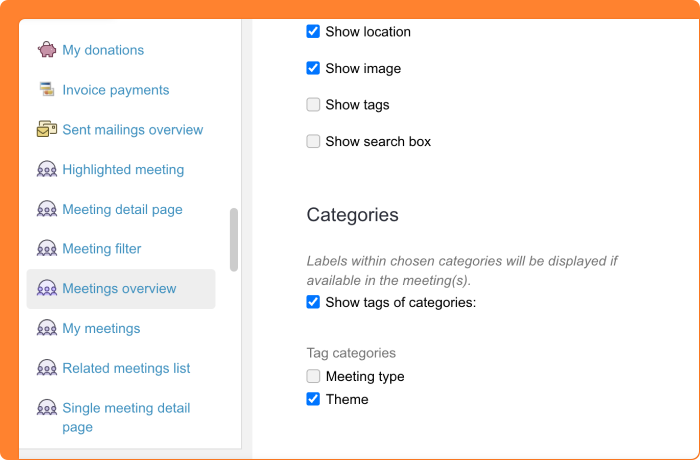
Your website contains various blogs and events, each with their own labels. But sometimes you want to show not only the labels of a specific post or event, but also the labels that belong to the category it's part of. Think of a blog about a particular theme or a series of events within a program line.
In the settings of articles of the type 'Weblog post overview', 'Weblog post detail page', 'Events overview', and 'Event detail page', you can now check 'Show label categories'. This displays the labels of the associated categories alongside the labels of the post or event itself. You'll only see categories that belong to the weblogs or events you've selected at the top.
This functionality is available for websites using the Sapphire template. Want this in a custom template as well? Contact your account manager to discuss the options.
Communities: email notifications now fully user-controlled
Your organization has a community where members connect through various channels. Users could already turn their email notifications on or off per channel by following or unfollowing a channel. However, there was also a setting in the admin environment to disable notifications entirely. This caused confusion: users thought they were adjusting their preferences, but noticed no difference when the backend setting was turned off.
From now on, control over email notifications lies entirely with the users themselves. The admin option to disable notifications has been removed. Users decide for themselves whether they want to receive notifications by following or unfollowing a channel. This makes the behavior predictable and transparent.
CRM: process new registrations in bulk
When someone registers through your platform, they receive an activation email to confirm their registration. Usually this runs automatically and you don't need to do anything. Registrations that aren't activated disappear automatically after a set period.
Sometimes you want to intervene manually. For example, when someone registered with a typo in their email address. Instead of having the user fill in everything again, you can correct the email address and activate the registration yourself. Or you want to process multiple registrations at once during a campaign.
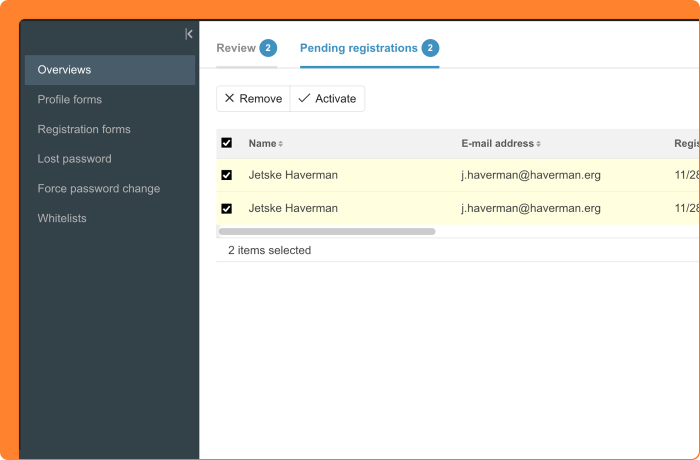
From now on, you can select multiple registrations in 'Profile & registration' and activate or delete them all at once. Filter the list to find specific registrations and process them with a single action.
Additionally, the screen has become more organized with two separate tabs: 'To review' for registrations and profile changes that need approval, and 'Waiting for activation' for registrations where the user still needs to confirm. Behind each tab, you can immediately see how many items are waiting.
CRM: split selections for targeted campaigns
Your organization wants to send a newsletter to a large group of relations, but you're curious which version performs better. Should you use the catchy subject line or the informative one? And which call-to-action works best? To test this without emailing your entire database at once, you can now split selections.
With this new feature, you divide an existing selection into two to five smaller groups. You determine the percentage per group yourself - the final selection automatically contains the remainder. Relations are distributed randomly, giving you a representative sample from your original selection.
In practice, this works as follows: you have a selection of 10,000 newsletter recipients. You split it into three groups: 10% receives variant A, 10% receives variant B, and 80% waits. After a few days, you analyze which variant yields the best results. You then send that version to the remaining 80%.
The split selections remain linked to the original selection. After completing your test, you can clean up the temporary selections. Start with the remainder, as it's based on the other selections.

Meetings & Events: participant numbers at a glance with refreshed program overview
You're organizing an event and want to quickly know how things are going: how many registrations are there, which activities are filling up, and where is there still room? Until now, you had to look in different places to get this complete picture.
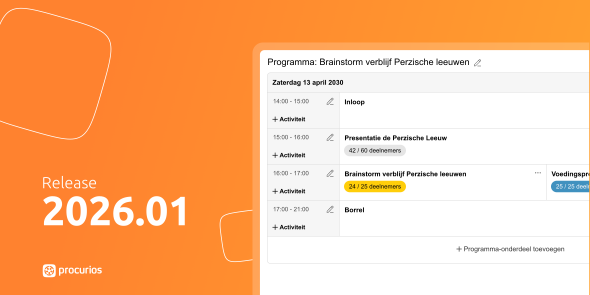
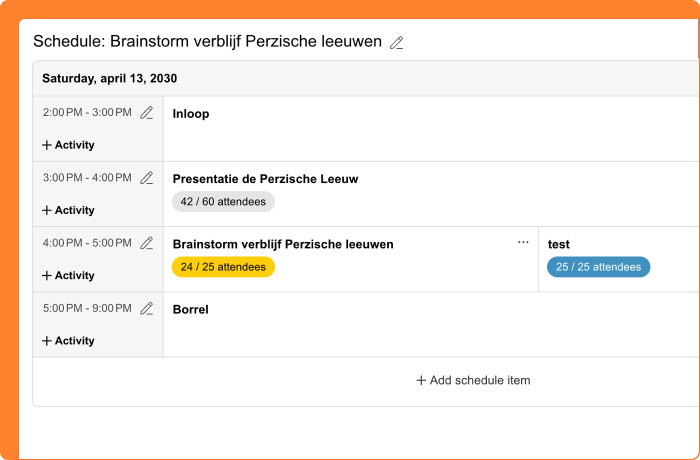
From now on, you'll see the key numbers right where you need them. The header of your event now shows the number of participants alongside the date (and the maximum, if set). For tickets, you can see how many have been sold. And in the program overview, you'll see the number of registered participants and the maximum per activity.
The program overview has also received a fresh update. You can immediately see which speaker is linked to an activity. The numbers get a color when an activity is almost (90%) or completely full. Less relevant actions are now tucked under the three dots, giving the important information more space. And do you have an extensive program with many parallel activities? The page now scrolls horizontally, so everything remains readable.
Note: For some older events, the new number in the header may differ from the count in the participants overview. This is because relations may have been deleted or archived in the past. The number in the header is the actual count used to check whether an event is full.
Meetings & Events: more personalization options in emails
When sending emails about meetings and events, you want to address participants as personally as possible. Using only a first name isn't always appropriate, for example in formal communication. And sometimes it's relevant to mention which organization a participant belongs to.
That's why two new field codes have been added for emails within Meetings & Events. The full name field code allows you to address participants more formally when appropriate. The participant's organization field code makes it possible to reference the company or institution where someone works in your email.
Meetings & Events: personalized URLs for materials and participant list
You're organizing an event where participants need access to materials or the participant list. These sections are only visible to logged-in users. But not every participant has an account on your website. Especially when someone else registered them. In those cases, participants couldn't view the restricted pages at all.
From now on, you can include personalized URLs to the 'Materials' and 'Participants' sections in your emails. These links contain a unique token that gives the recipient direct access, without an account or logging in. This works just like links for modifying or canceling a registration. Using the same link, the participant can also navigate to their own registration.
Meetings & Events: prevent accidental emails when duplicating events
Your organization regularly hosts similar events. To save time, you copy a previous event or use a template. This is convenient because it includes all associated emails. But what if the scheduled send time for those emails suddenly falls in the past after copying? They would be sent immediately, even though you might still want to adjust the content.
From now on, emails are automatically deactivated when the calculated send time falls before tomorrow. You'll receive a notification and be directed to the emails page, so you can review the settings before anything is sent. This prevents relations from accidentally receiving emails with incorrect information or dates.
This applies when copying an event or creating a new event based on a template. When creating or copying templates themselves, this doesn't apply since no specific dates are involved.