Release 2026.05
As of April 28, 2026, all customers of the Procurios Platform will use release 2026.05. In this blog you can read what is new and what has been improved.
Communities: keep important messages at the top
When managing a community channel, important messages can quickly get buried as new content pushes them down the timeline. You know certain posts deserve ongoing attention, whether that's an announcement, frequently needed information, or a temporary notice.
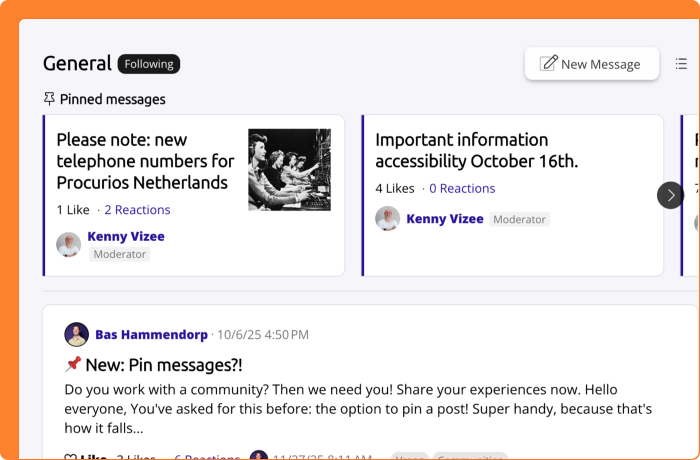
The option to highlight a post already existed, but highlighted posts still scroll down with the timeline. From now on, you can also pin a post to the top of a channel. A pinned post stays at the top of the channel at all times, regardless of how old it is or which page a visitor is on.
The pinned post also stays in its original place in the timeline. This means the pinned post and the first post in the timeline may sometimes be the same one. Keep that in mind when deciding which post to pin.
Both Community Managers and Moderators can pin posts using the dropdown menu at the top right of a post. To unpin a post, use the same dropdown menu.
A few things to know: the pinned post is only visible at the top of the channel itself, not on the community's home page. To draw extra attention to a post on the home page, use 'Highlight this post' instead.
Finance: payment references per administration
When managing payments, you use payment references to link transactions to invoices or subscriptions. If your organization works with multiple administrations, anyone with access to the Payment References module used to see all references from all administrations at once. To prevent staff from seeing data that wasn't intended for them, the entire module was sometimes restricted altogether. That was an unwieldy workaround.
From now on, the overview includes an 'Administration' column, making it immediately clear which administration each reference belongs to. In addition, a user only sees the payment references from the administrations they have access to, the same ones as in Invoicing. This means you can simply grant staff access to the module without them seeing references from other administrations.
Existing payment references have been automatically linked to the correct administration, based on the invoice, subscription or fund they were connected to.
Finance: QR code payment link on the invoice
When managing your invoicing, you want your relations to be able to pay as easily as possible. If you send invoices by email, you can already include a payment link in the email that takes your relation straight to the payment page. But for relations who receive their invoice by mail, there was no similar solution. They still had to enter the payment details manually.
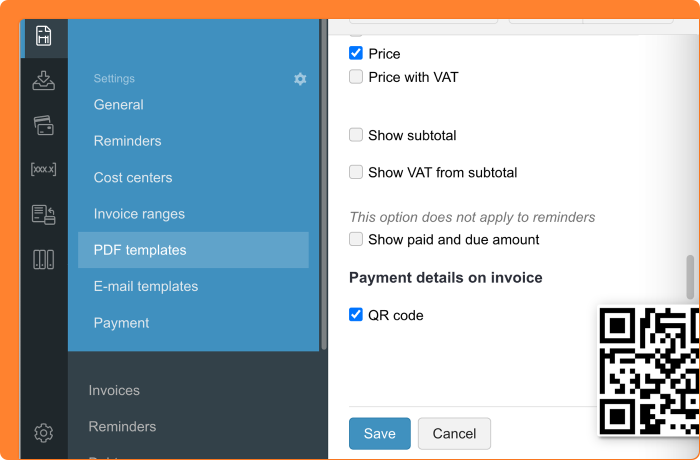
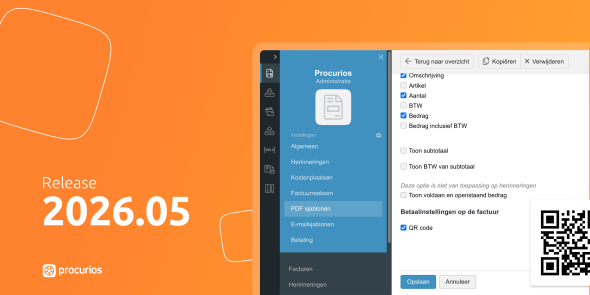
From now on, you can add a QR code with the payment link directly to the invoice. Your relation scans the code with their smartphone and lands straight on the online payment page. This makes fast and easy payment available for those who receive their invoice on paper as well.
You set this up in the PDF template of the invoice. Check 'QR-code' in the section Payment details on invoice to add the QR code. The QR code automatically appears on invoices where your relation needs to pay manually. It does not appear on invoices that are collected via direct debit.
Please note: this feature is only available if the online invoice payment module is activated and 'Enable payments' is checked in the administration settings. Want to set up online payments for your invoices first? Read how to set up an online payment page for invoices in the Help Center.