Release 2026.09
As of August 25, 2026, all customers of the Procurios Platform will use release 2026.09. In this blog you can read what is new and what has been improved.
API: also retrieve non-active function assignments
Does your organization use an external system that retrieves function assignments through the API? Think of a website that displays board positions, or a tool that keeps track of roles within your organization. Until now, the Function API only returned active function assignments. If you also wanted to see functions that have already ended, for example to build a historical overview of who held which role, this wasn't possible through the API yet.
From now on, the Function API has a new filter: 'includingNonActive'. Add this parameter to your request, and the API also includes the non-active function assignments in the response. This lets you show a complete picture in your external system, covering both the current and past functions within your organization.
You'll find the full documentation on this and other API endpoints at api.procurios.com.
Finance: filter by customer reference
When keeping your invoicing details up to date, you may run into a familiar challenge: a business relation's customer reference (think of a PO or purchase order number) often changes, for example once a year. Your relation doesn't always remember to pass on the new details, leaving you to track this down yourself. Until now, you could only keep track of this manually, for instance with a custom free-text field listing which relations to follow up with. That takes extra time and is prone to errors.
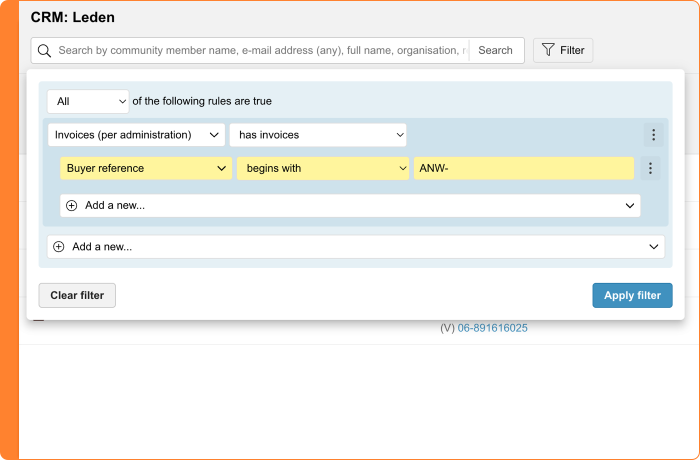
From now on, you can filter for this directly. The relation filter has a new option: 'Customer reference'. You'll find this filter under 'Invoices per administration'. It searches the value set in the debtor's invoicing settings. This makes it easy to build a list of, for example, relations without a customer reference, or relations you need to contact for updated information.
New to customer references on your invoices? Read how to set up this field in this release note.
Finance: new SEPA address format for direct debit
Does your organization collect membership fees or donations through direct debit? You may have already received a message from your bank about new SEPA rules.
From now on, the address of your members or donors is structured in the direct debit file. Street name, house number, postal code, city, and country code are now in separate fields. Before, this was all in one line of free text.
This change comes from the European Payments Council (EPC) and will eventually apply to all SEPA direct debits. The platform is already prepared for this: the address section in the XML file for your direct debits is automatically split into the correct fields. You don't need to set up anything yourself.
Finance: a more organized and efficient debtor page
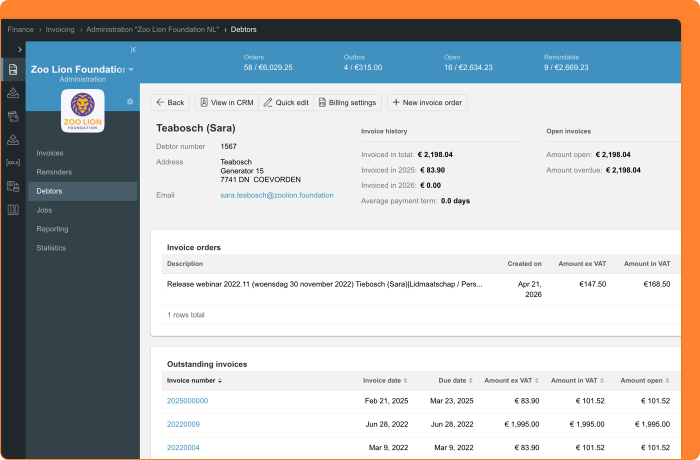
When you're following up on invoices, you want a complete picture of a debtor at a glance: which invoices you've already sent, what's still outstanding, and which invoice orders are open. The debtor page in Finance has been redesigned to give you that overview even more easily.
The summary at the top of the page now takes up less space, so you can see the rest of the page right away. On top of that, only the statuses that are actually relevant to you are shown: empty lists stay out of view, and an amount isn't displayed when a status has zero invoices or invoice orders. The count per status, such as invoice orders, open invoices, overdue invoices, reminders, and paid invoices, is now grouped together for a clearer overview. When the amount including and excluding VAT is the same, you'll now see just one amount instead of two.
You'll also find more relevant information directly on the page. This includes the debtor's invoice orders, as well as the email address used for sending invoices, based on your administration's settings. If no email address is known, this field stays hidden, a sign that this relation likely receives invoices by mail or via Peppol.
Want to create a new invoice order? You can now do this directly from the debtor page itself, without switching screens.
The 'Debtor settings' button also has a new name: 'Billing settings'. This name better reflects what you use it for. Here you can, for example, set the language of your invoices, configure e-invoicing via the Peppol network, and manage how your payment reminders work.
Mailings: turn tracking on or off
When you send a mailing, you might want to know how many relations open the email and click a link. This happens automatically: every mailing includes a tracking pixel and personalized links to collect these statistics. But this isn't always desirable.
New guidelines from French and Italian regulators provide more clarity about when you need consent from your relations for this type of tracking. That's why you can now decide, per mailing, whether you want to use tracking.
When you send a mailing, you'll find the 'Enable tracking' setting. If you choose 'Do not track opens and clicks for this mailing', we no longer add a tracking pixel to the email, and we don't personalize the links. You'll no longer see which recipients open the mailing or click on it.
What do we still track? Even without tracking, we keep the information needed to send and manage your mailing properly. You'll still see who received the mailing, whether a bounce came back, and whether someone unsubscribed. Personalized links to profile forms keep working.
Want to track part of your relations and not another part? Send two separate mailings to different relation selections, with tracking turned on or off for each one.
Please note: for now, this setting only applies to Mailings, not yet to Marketing Automation journeys.
Meetings & Events: cancellation date in participant overview
When managing registrations for an event, you sometimes run into a participant canceling their registration without being able to see exactly when that happened. This makes it harder to, for example, link the moment of cancellation to any cancellation fees.
That's why the participant overview of an event now includes a new column, 'Cancellation date'. This column shows the date and time when the status 'Canceled' was selected and saved. You add the column yourself through the column management button of the list.
Filtering on the status 'Canceled'? Then you'll also see two new fields: 'Cancellation date from' and 'Cancellation date to. These let you easily see which participants canceled within a specific period.
This gives you more insight into cancellation behavior around your events.
Platform: filter status always visible, even with an open filter panel
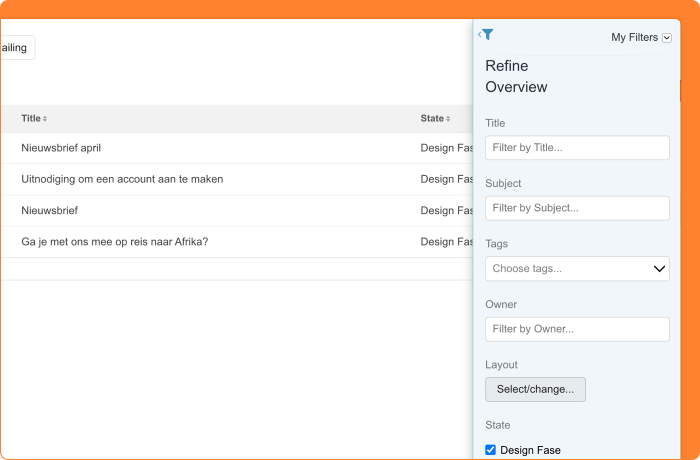
When managing large lists of subscriptions, donations, or invoices, your team often filters on several criteria at once. It's useful to always see at a glance which filters are active. Until now, this status was only visible when the filter panel was collapsed. As soon as you opened the panel, the indicator disappeared, and you had to remember yourself which filters were still applied.
From now on, the filter status stays visible at all times, whether the filter panel is open or collapsed. This keeps you in control, even while you're adjusting your filters.
Please note: if you use a filter panel that filters immediately without needing to first press the 'Filter' button, such as the participant overviews in Meetings & Events, you won't see this improvement yet.
Read more about filtering in overviews in the Help Center.
Other changes in this release
- Easier language switching in the footer: visitors to your website now see all available languages directly in the footer, without first having to click a globe icon.
- Same accounting code for all funds in Memberships & Organizations: do you use Memberships & Organizations (Local Administration) to automatically create a fund for every department? If you want to use the same accounting code for every fund, you can now fill this in right away. Prefer to set your own accounting code per fund? You can still do that via Donations > Funds.